Random blog.. Stuff I find interesting and feel like sharing with the community will be listed here!
Friday, January 22, 2010
Uff Teri Ada!
Am putting up this beautiful song from Karthik Calling Karthik, Farhan Akhtar & Deepika's new movie.
Uff Teri Ada... what a catchy tune ;-) enjoy!!!
Saturday, December 5, 2009
Iktara, the missing track!
I managed to get this track from Karan Johar's tweet, and decided to upload it on my blog to make it a quick share! Spread the word people... share this song. Its really cool.
Tuesday, October 20, 2009
Interesting experiment from Google
Known for its simple and a clean user interface, the Google Search Homepage has not been touched for over 10 years. Apart from the only change that happens to Google logo/ Doodles, Google has never experimented with its homepage.Note: If you have installed Silverlight, you might not be able to see this effect! In other words, if you don't want this effect, install Silverlight :-D
Saturday, August 8, 2009
K3b and MP3?
To get rid of this message, and to install MP3 support, type in the following in terminal:
yum install k3b-extras-nonfree
Restart K3b and that message won't be displayed any more!
Saturday, July 25, 2009
MP3 Support in Fedora 11
Follow these steps: (Log in/ su as root and install the following repos)
rpm -Uvh http://download1.rpmfusion.org/free/fedora/rpmfusion-free-release-stable.noarch.rpm
rpm -Uvh http://download1.rpmfusion.org/nonfree/fedora/rpmfusion-nonfree-release-stable.noarch.rpm
Additional Plug Ins
yum -y install gstreamer-plugins-bad gstreamer-plugins-ugly xine-lib-extras-nonfree
Install XMMS Multimedia Player and make is MP3 capable ;-)
yum install xmms xmms-mp3
That's it! type xmms in the terminal, and you can now play MP3 on your Fedora 11 installation!
Adding/ Mounting NTFS partion in Fedora 11
su -c 'yum install ntfs-3g ntfs-config'
The ntfs-config package is as small as 367 kb. Once installed, simply take a backup of the existing fstab file, just in case if you happen to encounter some screw up!
cp /etc/fstab /etc/fstab.original
Now run:
su -c 'ntfs-config'
You will be presented with a nice UI and am sure, it is quite simple to understand what needs to be done, once the application is running :-)
Update Firefox on Fedora 11
su -c 'yum update firefox'
Its about a 28M download. Simply restart your Firefox browser after yum finishes doing its business and you are good to go!
Thursday, July 9, 2009
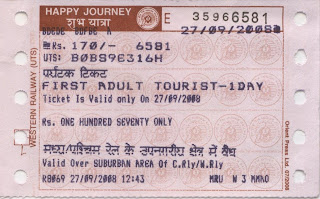
Tourist Pass

Tuesday, April 28, 2009
O&M creates ‘ZooZoos’ for Vodafone

Wednesday, April 8, 2009
Google Easter Egg
Tuesday, March 10, 2009
Change Display Font Size on Lotus Notes
Friday, March 6, 2009
Retrieve BLOB column in Sybase
Yeps, so, why don't you try that? Give it a try. I used the jconn3 driver to connect to my Sybase database. Driver Class being 'com.sybase.jdbc3.jdbc.SybDriver'. The moment you try to call the getBlob() method, you will get a nice exception stack trace, informing you that this is an unsupported operation! Yeps, its not as straight forward as that!
But don't worry, it actually is even more simple! For fetching the BLOB data all you need to do is:
// build a byte array
byte stuff[] = resultSet.getBytes(
// check the size of the data now
System.out.println("BLOB Size: " + stuff.length);
Congratulations! You have retrieved the BLOB data from a Sybase IMAGE column!!!
Saturday, September 6, 2008
Norton 360, Post Uninstall Internet Problems?
As some days passed, some genius people managed to find a working crack for my favourite antivirus systems and I happily uninstalled Norton 360. I tried evaluating both the antivirus softwares... i.e. Eset NOD32 3.x and Kaspersky. Post installation, I faced the same problem for both the systems. My Internet refused to work! I mean, my Internet was working, my browsers refused to work or for that matter, any connections from any ports. I wondered what was causing this problem, and eventually realised that McAfee and Norton, have certain annoying uninstallation tools, to completely uninstall their respective products. I remember of having faced this problem with McAfee, and Norton was no exception to this silly thing either!
So if any of you people, who have faced such a weird problem, your answer to all your misery's is... ftp://ftp.symantec.com/public/english_us_canada/removal_tools/Norton_Removal_Tool.exe and this is only for Norton products. Google a similar removal tool for McAfee if you witness such weird problems!
Tuesday, August 12, 2008
Norton Keygen... how to use it?
- Unrar, Burn or mount with Daemon Tools.
- DISCONNECT FROM THE INTERNET! THIS IS IMPORTANT!
- Run the installer, and run the EDGE keygen located in the Keygen dir.
- Copy the Product Key from the keygen to the Norton Setup then press the I Agree button.
- Complete installation and finally you will get to the activation, it's important that you are NOT connected to the Internet! Press the Next button.
- A message box will come up telling you that you need Internet connectivity to continue, just press the OK Button, and then press the Next button.
- You will get to a part where it's trying to connect to the Internet for online activation, after a while it will fail, this is fine, repeat this step again.
- After attempting to do online activation two times, it will fail and open a browser window. Before you close the browser window, copy the URL that appears in the address bar. (In my case, the Activation actually failed, so you have to copy the URL instantly...) Paste this URL in the keygen now and press that Generate button!
- Bingo, you now have an Activation key generated in the box! (It is typically in an XML format i.e.
and so on... - Now copy the Request Code into the Request Code field in the keygen, no dashes or spaces just one long string. Select how many years you want to license the software for, and press the Generate button to get your Unlock Code.
- Copy the generated Unlock Code to the Norton activation screen, then press the Next button.
- Enjoy a fully unlocked copy, and naturally DO NOT register this software with Norton, you can now reconnect to the Internet.
- Contact me if you still are not able to get through!
Monday, January 7, 2008
Windows XP SP3 & HD Audio Issue (Intel DG965RY)
To my surprise, the Driver installer could not install Intel Audio Drivers! I then noticed, that the Device Manager was displaying a PCI Device under the 'Unknown Devices' heading. I was a little surprised to learn that Windows XP was not detecting my HD audio!
The only way to really fix this issue is... You download the latest drivers from Intel Website for your specific motherboard. In my case, it was Intel DG965RY. Once extracted, navigate to \HDAQFE\xpsp2\us\ folder or the \MSHDQFE\Win2K_XP\us\ folder. (The name of this folder depends on your desktop board model.). Extract the file KB file there and now, just go to the Device Manager and click update driver, specifying the location/ path where you just extracted the KB file.
You should now be able to install your HD Drivers! I don't understand in the first place, as to why this problem occurred... It probably means that Microsoft forgot to put in the HD Drivers in the Windows XP SP3 integrated CD?
Saturday, November 3, 2007
Windows Vista & the 4GB RAM Nightmare!
So I installed the sticks with an anticipation of a rocking speed to my PC and great boot times. All that was turned into a nightmare, when I noticed that my Windows Vista Ultimate is taking over a minute and a half to boot my installation! My earlier RAM, standing @ 2 GB was booting it much much faster! I tried frantically to do somethings to get the boot time up. The first thing that did strike me is my previous experience of Windows OS installations. Add a new hardware, and Windows sometimes tumbles down! That was my first guess. So my troubleshooting started with re-installing my OS. Interestingly, the installation too, was taking ages! I had to abort installation and install just 2 Gigs of RAM to get my new installation up and running... What do I do now? :-)
Well, this is how I troubleshooted... And am sure, this is something that will work for all those out there who own an Intel DG965RY OR (DG965XX series). My motherboard was at 1687 BIOS version. The following technet forum helped me solve my problem. I upgraded my BIOS to 1698, the release note clearly specifies that the fix in this release is to handle the slow boot issue when 4 Gigs of RAM is installed. Also, I installed one KB fix. Installing just the KB fix did not help me. Only after upgrading my BIOS to 1698 did the RAM's work for me :-)
The Technet Forum I am referring to:
http://forums.microsoft.com/technet/showpost.aspx?postid=1292561&siteid=17&sb=0&d=1&at=7&ft=11&tf=0&pageid=0
The Microsoft KB I am referring to: (KB929777)
http://support.microsoft.com/kb/929777
In case you face such similar problems, feel free to drop in a line to me :-). I'll be more than glad to help you!!
Saturday, October 6, 2007
Lamington Road... "Andar ki khabar" :-)
So, try and remember whether this has happened to you, when you were at a PC peripheral shop? You go to the shop/ retailer, ask him for something, say an LCD monitor or DDR RAM... the retailer quickly picks up his phone and makes 2 phone calls, one for the LCD and 1 for the RAM. Now, some expenses conscious users like me and my friend thought, how the hell can he afford to sell this stuff at such a low price, make these contingent phone calls and even make profit and run his shop...
The answer to this is, he does not make any normal outbound calls. The entire Lamington Road is actually connected on an Inter Com. The phone call he makes rings at the brand distributors warehouse directly, who by the ways is in some remote unknown place... some khufiya jagah. E.g. If you wish to purchase an LG LCD Monitor, the retailer makes a call to the LG Distributor, who by the way is just 1, in the market. There is 1 unique distributor, for almost all products. The Transcend guy, the ViewSonic guy, all are sitting at such remote places, which we ain't aware about, and that's where all the intercom calls are routed!
The price difference you notice is because the retailers define their profit margins. Off late, these guys don't really have a big profit margin. He might be selling an LCD monitor for a profit of INR 100, or might be selling RAM modules for a profit of INR 50.
Just make sure, you bargain! The best way to negotiate and bargain is to do shop hopping! Yes, do that. Visit every shop you can, which you find looks nice & is crowded. The more the crowded it is, the best & the lowest price is what you'll pay.
Me & my friend visited a couple of shops today... Terabyte, Hardtrac Computers (We got our stuff from here), PC Guide (Is actually, perhaps the biggest & most easily recognizable shop @ Lamington, Perfect Electronics... to name a few...
Anyway, happy shopping at Lamington :-)
By the wayz, I got two 1 GB, 800 FSB Transcend RAM for INR 1500 each. i.e. INR 3000 total. I was first quoted a price of INR 1650 each. You see, after hopping around 7 shops, I finally got it for INR 1500! My friend was quoted INR 9450 for a ViewSonic 19" wide screen monitor. We finally got that price down to INR 9150. Of course, he eventually purchase an LG Wide screen monitor for INR 10K, but I just wanted to give you an idea of how well you can negotiate!
Saturday, August 11, 2007
64-bit OS, Whats the Big Deal?
I started my 64-bit experience by installing the 64-bit Windows Vista Ultimate OS. Let me tell you, the installation process, look and feel and everything of the OS is just like its 32-bit variant. No difference at all! So, don't expect to look at the desktop and figure out if it's a 64-bit or a 32-bit! The only way to figure that out is to check your system properties, which gives you the following screen... See at the bottom where it mentions, that this is a 64-bit Operating System

Fine, so I was done, installing the OS now; what was new? The very first question I had was, Do I strictly need 64-bit applications for installing & running them on a 64-bit OS? The answer is 'NO'! You can very much run your 32-bit apps. However, the device drivers need to be 64-bit compulsorily. All hardware devices need 64-bit drivers to work on a 64-bit version of Windows. So if you are running some old legacy devices (quite unlikely) first make sure that 64-bit OS specific drivers for the same are available! I got a nice error screen while I tried to install 32-bit display drivers for my GeForce 7600GS Video Card.
So, how does Windows allow you to install 32-bit apps on a 64-bit OS? The answer to this is WOW64! Now I know, Vista was majorly using this keyword 'WOW' in the Vista marketing campaigns and product promotions, but there is a lot of difference in both these WOW's :-D! The WOW that I am talking about stands for 'Windows 32-bit on Windows 64-bit (WOW64 or WOW)', a subsystem of the OS.
What's the big deal? I mean, I have a 64-bit OS, I'll install an application & expect it to run. What's with these numbers? What's with the difference in 64-bit & 32-bit? The issues are related to the 64-bit processors and Windows itself.
The processors run in two modes: 32-bit and 64-bit. In the 64-bit mode, the memory pointers are larger than in the 32-bit mode. While this gives the 64-bit applications access to more memory, the execution contexts and data are incompatible with 32-bit applications. As a result, 64-bit and 32-bit code cannot be mixed within a single process. For example, if a 64-bit process loads a 32-bit Dynamic Link Library (DLL), or vice versa, an error results, saying that the DLL format is incorrect. Consequently, 32-bit applications cannot use the 64-bit system DLLs. WOW64 solves these and other problems.
That's all that I know about WOW... and also one more thing... Wondered how the segregation of 32-bit and 64-bit applications is done by Windows OS while installing a new program/ application? Well Well Well, Vista makes a new folder, 'Program Files (x86)' & also just 'Program Files'. As the name suggests, 1 is for storing your 32-bit apps while the other one is for you 64-bit apps!
That's all I know about the 64-bit OS. If you have any questions or even extra information to share, please drop in a comment. I'll try to answer the questions, if I can & would be more than happy to learn more, from the extra info that you might have for me :-)

Wednesday, July 18, 2007
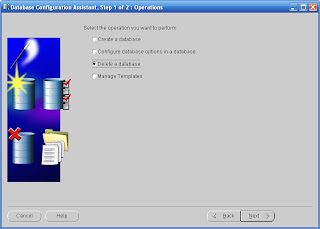
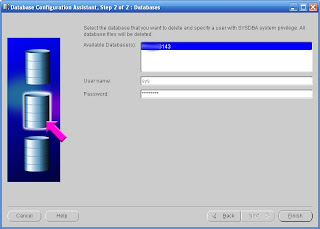
How to delete / drop a Database in Oracle 9i


So what all does get deleted?
Friday, July 13, 2007
The ISP Scene in Mumbai, Bandra (East)
For all those who perhaps don't know this, that the Mumbai cable walla's providing the Internet service to you, are nothing but intermediaries and agents for the above mentioned commercial players. Of course, these guys don't really have much command when it comes to commercial connections for big business houses, but for small residents like you and me, the cable walla's are the bhai's!
The whole idea of this post is not only to reflect upon the appalling scene that we are living in, but also, my review on 2 ISP's that I've always been connected to at my residence in Bandra.
From 2002 - 2005, I was connected to the beautiful Internet world via my local cable operator, who was purchasing and distributing bandwidth from Exatt technologies. Now these guys supply bandwidth to a lot of cable operators across Mumbai. I don't know about the ownership of Exatt, but somewhere in May / June 2007, Exatt was taken over by the mighty American giant, AOL. I've heard, the service has improved since then :-). Also, just FYI, the backbone bandwidth carrier for Exatt is Tata Broadband. These guys have a huge backbone infrastructure to carry bandwidth, across Mumbai for these guys...
Coming to my opinion about Exatt... These guys have given me a complete mixed experience. Sometimes, the service is just really great! While sometimes, it is simply depressing. These guys are just not able to define a proper downtime. And rainy season is the most harrowing experience with these guys... I mean, imagine, its raining heavily on a Saturday morning. You can't move out of the house (read, you don't want to move out of the house ;-))... you just want to make yourself a hot cup of coffee and want to surf the internet for technology news and events... you start your PC only to find that the local area network cable is unplugged... In an absolute angry mood, you dial your ISP (read local cable operators) number to abuse him, only to learn that he is such an a*****e that he has kept the receiver aside to avoid calls... This is such a common technique used by these guys :-)
Next, for almost about 1 year, I used the services of Sify Broadband. Sify scared of the local dada's and bhai's went through a different approach. Instead of competing with them, they joined hands with the local cable operators & started their services. Needless to say, Sify is Terrible too. I don't want to comment much on & about Sify, but yes, it sucks!
Recently, I installed the Reliance Broadnet Service at my place. I pay about INR 1122 per month for a 300 Kbps connection. And let me tell you, the service so far has been excellent. There are no down times (but once, when there were heavy rains). The support is just about OK. Sometimes, the support guys fails to understand your query! But the speed has been really good. It is fast, and always manages to deliver a constant speed :-). Also, the -ve about Reliance Broadnet is bill payment. They don't have an online bill payment facility :-(. So if a Reliance drop box is near your house, then you have absolutely no worries!!